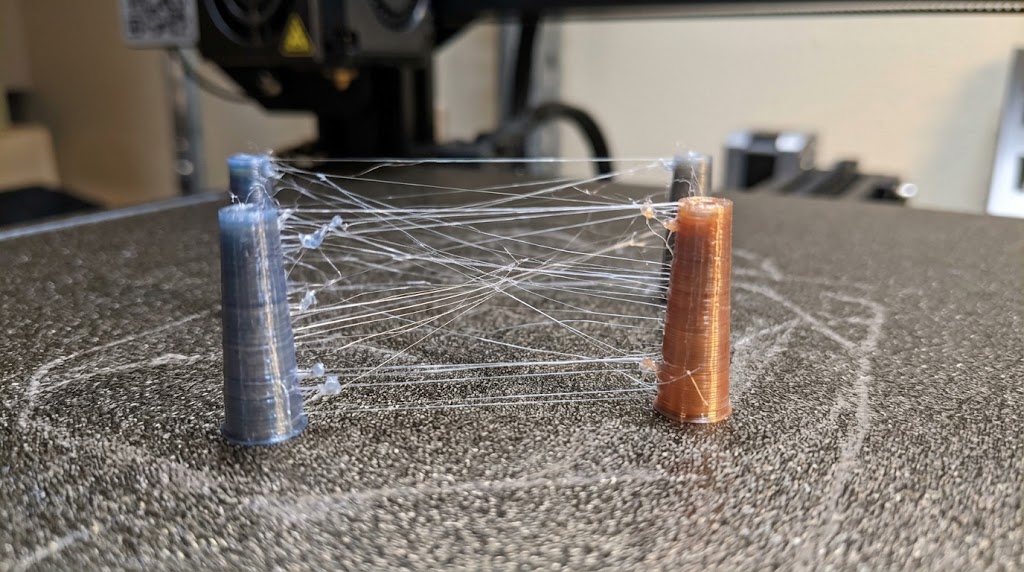
Stringing is the fine strings or hairs a printer leaves behind on travel moves between two parts. They look like cobwebs and are especially common with PETG and TPU. The good news: usually a single change is enough, and the right order saves you a lot of trial and error.
In 30 seconds
The four most common causes, sorted by likelihood. Change only one thing at a time and print a small test afterwards.
- The filament is wet. Dry it. This is the most common cause.
- The nozzle is too hot. Lower it in 5 °C steps.
- Retraction is too short or too slow. Increase it step by step.
- Travel moves are too long. The print head should not cross over the part.
How to tell the cause
- Strings plus crackling or hissing at the nozzle, a rough surface, tiny bubbles: the filament is wet.
- Strings and small drops at the nozzle, a glossy surface: the temperature is too high.
- Strings only on long paths between parts, not on short ones: retraction and travel moves.
- Another spool of the same material prints cleanly: the problem is the spool, so moisture.
A comparison spool is the best tool you have. If a second spool prints cleanly, you do not need to touch a single setting.
Step 1: Dry the filament
Filament absorbs water from the air. When heated, it turns to steam and pushes material out of the nozzle even when the printer is not feeding.
- Rules of thumb: PLA about 45 to 55 °C, PETG about 60 to 65 °C, at least 4 to 6 hours. The manufacturer's figure on the spool takes precedence.
- A filament dryer is safer than a kitchen oven, whose temperature often deviates a lot.
- Afterwards store it airtight or print straight from the dryer, otherwise the spool is wet again within days.
Step 2: Lower the temperature
Filament that is too hot is runny and drips. Lower the nozzle temperature in 5 °C steps. If it gets too cold, you will notice gaps in the walls and poor layer adhesion. A temperature tower prints several temperatures in one go and shows you the best value for that exact spool.
Step 3: Set up retraction
During retraction the extruder pulls the filament back briefly before the head moves.
- Rules of thumb: direct drive extruders often 0.4 to 1.0 mm, Bowden 3 to 6 mm. Speed about 30 to 45 mm/s.
- Increase in small steps: 0.2 mm for direct drive, 0.5 mm for Bowden.
- More is not always better. Too much retraction can cause gaps or a clog.
- Bambu Lab's default profiles are tuned for original filament. If only third-party filament strings, dry it and check the temperature before you change retraction.
Step 4: Shorten travel moves
- Enable the option to avoid crossing walls. The head then travels inside the part instead of over the outer wall.
- Lifting the nozzle on every travel move (Z hop) can encourage strings with some filaments. Try it switched off or with a small value.
Slicer settings
Names can differ depending on the program version.
Bambu Studio and OrcaSlicer
- Retraction: printer settings, Extruder section, Retraction. Length and speed are there.
- Z hop: in the same section (Z hop when retracting). OrcaSlicer also offers a spiral Z hop.
- Avoid crossing walls: in the process profile under Quality.
- If the filament profile overrides retraction, the filament profile value applies.
PrusaSlicer
- Retraction: Printer Settings, Extruder 1, Retraction section. Length, Speed and Lift Z are there.
- Avoid crossing perimeters: Print Settings, Layers and perimeters, Advanced.
- Here too, the filament profile can override retraction.
UltiMaker Cura
- Retraction: material settings, Retraction section. Enable Retraction, Retraction Distance and Retraction Speed are there.
- Travel: set Combing Mode to Not in Skin.
If it still persists
- Check the nozzle. A worn or dirty nozzle can drip.
- Thin strings can be removed afterwards by carefully passing a heat gun over them, or by cutting them off.
- Print a small test model with two towers so you can check each change on its own.
Further reading
- Teaching Tech Calibration: temperature tower and retraction test to print.
- OrcaSlicer: comes with its own calibration prints for temperature and retraction.
- Prevent warping: when corners lift off the print bed.
- Fix layer shifts: when layers slip sideways.
- Which filament for which purpose: PLA, PETG, ABS, ASA, TPU and nylon compared.
- Print cost calculator: failed prints cost material and time, enter them as scrap.
- More tools in the directory
All values are rules of thumb and depend on printer, nozzle and filament. When in doubt, follow your manufacturer's specifications.